Choosing a crypto hardware wallet is a choice about how you will manage keys, check security claims and access your assets over time. Ledger and Trezor are two established brands, but their approaches differ: Ledger pairs its devices with a broad app ecosystem and supports many assets, while Trezor puts greater emphasis on open-source hardware and software. Ledger tends to suit people who want wider compatibility and an all-in-one companion app; Trezor is a stronger fit for users who prioritize inspectable software and a simpler self-custody workflow. Neither brand makes cryptocurrency risk-free: users still need to protect their recovery phrase, verify transactions and buy devices through trusted channels.

Get hardware and tech essentials delivered free with Prime
- Fast, free delivery on millions of items
- Prime Video, Amazon Music and more included
- Member-only deals all year

Trezor Safe 7 Crypto Hardware Wallet with Bluetooth and Color Touchscreen
- ✔ Security: TROPIC01 chip and EAL6+ Secure Element
- ✔ Display: High-resolution color touchscreen
- ✔ Connectivity: Encrypted Bluetooth and USB-C
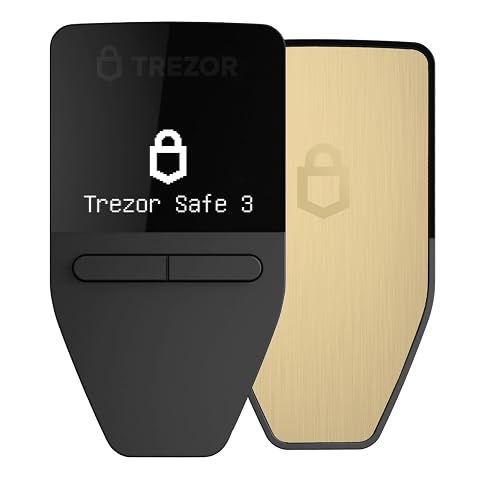
Trezor Safe 3 Crypto Hardware Wallet, Solar Gold
- ✔ Security: EAL 6+ secure element
- ✔ Display: OLED
- ✔ Connectivity: USB-C

Ledger Nano X Bluetooth Crypto Wallet
- ✔ Connectivity: Bluetooth, NFC, and USB
- ✔ Display: 1.1-inch OLED
- ✔ Memory storage: 2.05 MB
At a Glance
| Criteria | Ledger | Trezor | Winner |
|---|---|---|---|
| Security approach and transparency | Secure Element chips are used in several Ledger models; firmware and app components are not fully open source. | Open-source firmware and software enable public review; supported models use different hardware security designs. | Depends |
| Asset and network support | Broad support across coins, tokens and networks, with availability varying by device and app. | Wide support for major coins and tokens, though some networks or functions may require third-party wallets. | A |
| Companion software and usability | Ledger Live combines portfolio views, account management and supported crypto actions. | Trezor Suite provides device setup, account management and supported asset actions in a clear interface. | A |
| Advanced features and integrations | Strong third-party wallet and app integrations; some features depend on Ledger Live or external services. | Integrates with external wallets and services; availability and features differ by model and asset. | A |
| Device and recovery options | Multiple device tiers; certain models offer optional Ledger Recover, a paid recovery service. | Several device tiers, including models with touchscreens and, on some models, Shamir Backup support. | Depends |
| Price and overall value | Entry-level models are often competitively priced; premium models cost more for added connectivity or display features. | Entry models can be affordable; higher-end models charge more for larger displays and additional hardware features. | Depends |
Trezor Safe 7 Crypto Hardware Wallet with Bluetooth and Color Touchscreen
The Trezor Safe 7 is the most capable device in this group for people who want to inspect transactions directly on a larger screen. Its color touchscreen makes navigating and reviewing signing details more approachable than the Safe 3’s OLED, while the TROPIC01 chip plus EAL6+ Secure Element gives it a distinct dual-chip security design. Those features make it our premium choice for users who expect to interact with their wallet regularly, rather than store it away and rarely sign.It also has the strongest everyday-use brief: encrypted Bluetooth, USB-C, a LiFePO₄ battery, an aluminum body, reinforced glass, and IP54 dust and splash resistance. Compared with the Nano X, the Safe 7 pairs mobile connectivity with a larger color interface and explicit splash protection. Against the Safe 3, it adds wireless interaction and a more substantial display, but that richer experience means more hardware features to manage. Qi2 charging requires a compatible charger, and the product information leaves the case type unspecified. It is not the simplest pick if you only need occasional offline signing; its premium hardware earns its place when the screen, connectivity, and durability matter to our routine.
Pros:
- Dual-chip security combines TROPIC01 and an EAL6+ Secure Element.
- Color touchscreen provides a larger area for reviewing transactions.
- Encrypted Bluetooth and USB-C support mobile and desktop workflows.
- IP54 rating, aluminum body, and reinforced glass add everyday resilience.
Cons:
- Qi2 wireless charging needs a compatible charger.
- Case type is not specified in the product information.
- Its broader feature set may be unnecessary for infrequent signers.
Best for: Crypto holders who regularly review transactions on-device and want mobile connectivity with a more durable, full-featured build.
Not ideal for: People seeking a basic, minimal wallet for occasional signing or who do not want to rely on compatible wireless charging accessories.
Bottom line: We recommend the Safe 7 for buyers who will use its larger screen, mobile connections, and more durable construction enough to justify its added complexity.
“We recommend the Safe 7 for buyers who will use its larger screen, mobile connections, and more durable construction enough to justify its added complexity.”
Trezor Safe 3 Crypto Hardware Wallet, Solar Gold
The Trezor Safe 3 focuses on the essentials that make a hardware wallet useful: a screen for on-device confirmation, PIN and passphrase support, and a recovery approach that includes multi-share backup. It earns our value-oriented role by offering meaningful protection and recovery features without the Safe 7’s color touchscreen, Bluetooth, wireless charging, or more rugged construction. That narrower design can be a benefit for buyers who want fewer conveniences to think about.Compared with the Safe 7, the Safe 3 is lighter and simpler, but it is less suited to signing on the go and lacks a stated dust or splash rating. Compared with the Ledger Nano X, it emphasizes the Trezor Suite workflow and recovery tools rather than Bluetooth-led mobile management. It supports thousands of coins and tokens through Trezor Suite, though buyers should still confirm their specific assets and workflows before committing. Setup and asset management depend on Trezor Suite, so it may not suit someone who wants a standalone, app-agnostic experience. The OLED is also smaller and less expressive than the Safe 7’s color touchscreen. For buyers prioritizing a clear confirmation screen and recovery options over mobile convenience, this is the balanced pick.
Pros:
- EAL 6+ secure element supports a security-focused design.
- OLED screen enables on-device transaction confirmations.
- Supports thousands of coins and tokens through Trezor Suite.
- Includes multi-share backup cards for wallet recovery.
Cons:
- Not water resistant.
- Requires setup and asset management through Trezor Suite.
- Lacks the Safe 7’s touchscreen and wireless connectivity.
Best for: Buyers who want PIN and passphrase support, on-device confirmation, and multi-share recovery in a compact Trezor setup.
Not ideal for: People who need Bluetooth mobile signing, a color touchscreen, or explicit resistance to dust and splashes.
Bottom line: The Safe 3 is our practical Trezor pick when recovery options and on-device confirmation matter more than advanced mobile features.
“The Safe 3 is our practical Trezor pick when recovery options and on-device confirmation matter more than advanced mobile features.”
Ledger Nano X Bluetooth Crypto Wallet
The Ledger Nano X makes the most sense for people who want a hardware signer closely tied to a mobile app. Bluetooth, a rechargeable battery, and a compact body let it connect with phones, while the Ledger Wallet app supports portfolio tracking and actions such as sending, receiving, swapping, and staking across supported blockchains. That app-centered workflow distinguishes it from the Safe 3, which is tied to Trezor Suite, and gives it a clear role for users who prefer managing crypto from a phone.Its tradeoffs are just as relevant. The 1.1-inch OLED is smaller than the Safe 7 touchscreen, so detailed transaction review has less room, and the supplied compatibility information excludes Chromebooks. The battery is described as lasting for hours but does not give a specific runtime, which makes it harder to plan around for frequent mobile use. Compared with the Trezor models, the Nano X foregrounds Bluetooth and app breadth rather than multi-share recovery or a stated dual-chip design. Mobile convenience is its defining strength, but buyers should verify their devices and supported assets before purchase. If we primarily sign from desktop or want a larger screen, the Safe 7 is a better fit; if we want simpler Trezor recovery features, choose the Safe 3.
Pros:
- Bluetooth supports mobile use with compatible devices.
- Compact design includes a 1.1-inch OLED display.
- Ledger Wallet app supports tracking and multiple crypto transactions.
- Works with desktop, iOS, and Android devices.
Cons:
- Not compatible with Chromebooks.
- Battery runtime is described only as lasting for hours.
- The small OLED offers less room for review than the Safe 7 touchscreen.
Best for: Ledger users who want Bluetooth connectivity and an app-based way to manage supported crypto workflows from iOS or Android.
Not ideal for: Chromebook users, people who want a large transaction review screen, or buyers who need a clearly stated battery runtime.
Bottom line: We’d choose the Nano X when Bluetooth access to Ledger’s mobile app is the priority and its device compatibility fits our setup.
“We’d choose the Nano X when Bluetooth access to Ledger’s mobile app is the priority and its device compatibility fits our setup.”
As an Amazon Associate we earn from qualifying purchases.
Key Differences
The central tradeoff is how each brand balances compatibility with transparency. Ledger’s Secure Element hardware and broad app ecosystem appeal to users who want a familiar device backed by a consolidated interface. Trezor’s open-source emphasis gives technically minded owners more opportunity to inspect the software and understand how the wallet works. These are different security philosophies, not a simple ranking: openness helps with public review, while a Secure Element is designed to resist physical attacks. A wallet’s safety also depends on setup, updates, recovery-phrase handling and transaction checks.
For everyday asset management, Ledger has an edge in breadth and convenience, though support differs by coin, model and software route. Trezor remains capable for many users and can connect to external wallets when its own interface lacks a desired function. Device price alone should not settle the choice. Pay more only for a specific benefit you will use, such as a preferred screen, connectivity option or recovery arrangement. For either brand, the more important investment is learning to verify addresses and protect the recovery phrase.
Detailed Comparison
Security approach and transparency (moderate difference)
Ledger uses Secure Element chips in several devices, a design intended to protect sensitive operations against physical attacks. Its firmware is not fully open source, which limits independent inspection of all device code. Trezor’s open-source approach makes more of its firmware and software available for public review. Some Trezor models also use specialized security hardware, so the details vary by product. This is a moderate, preference-driven gap: choose Ledger if dedicated secure hardware matters most; choose Trezor if inspectability matters more. Neither approach removes risks from phishing, a compromised computer or a stolen recovery phrase.
Asset and network support (Ledger wins — moderate)
Ledger generally covers a broader range of coins, tokens and networks, with some assets managed through compatible third-party wallets instead of Ledger Live. Trezor supports many major assets, but coverage varies by model and some networks may need outside software. Ledger wins by a moderate margin for people holding less common assets or wanting to manage varied holdings from one ecosystem. Check the exact coin, network and device combination before buying; a token’s name appearing in an app does not guarantee support on every network.
Companion software and usability (Ledger wins — minor)
Ledger Live brings account views, portfolio tracking and supported actions into one app, which can reduce app switching for routine management. Trezor Suite offers a clear setup and account experience, with external wallet connections available for some assets and features. Ledger wins narrowly on consolidated convenience, a minor-to-moderate difference depending on how many networks you use. Trezor may feel more direct to someone who wants a focused wallet interface. In both cases, a hardware wallet signs transactions; software displays them, so users should verify transaction details on the device screen.
Advanced features and integrations (Ledger wins — moderate)
Ledger’s large ecosystem gives it an advantage for users who want to connect with decentralized apps, staking services or external wallets, subject to asset and service availability. Trezor also works with third-party wallets, but the exact integrations differ, and some activities may require more setup. Ledger wins moderately for breadth and convenience. That advantage comes with a practical tradeoff: integrations can introduce extra service, smart-contract and phishing risks. For simple holding and occasional transfers, most users do not need the widest set of integrations.
Device and recovery options (moderate difference)
Both brands sell devices with different screens, connection methods and price points, so comparing entry-level models with premium ones can mislead. Ledger offers an optional paid recovery service on supported devices that splits recovery material among service providers; users should read its terms and decide whether that arrangement fits their threat model. Some Trezor models support Shamir Backup, which divides a recovery secret into shares. These are distinct recovery choices, not automatic upgrades to security. The winner depends on whether a user prefers a managed service, a self-managed split backup, or a conventional recovery phrase.
Price and overall value (minor difference)
Both brands offer lower-cost models and more expensive devices with upgraded screens or other features. Exact prices change by region and sale, so compare current official listings and the particular models under consideration. There is no universal price winner: an inexpensive device is better value when it supports the assets and workflow you need, while a premium device earns its cost only if its display, connectivity or backup options matter to you. Avoid paying extra for features that do not change your actual use.
Ledger: Pros and Cons
Pros:
- Broad coin and network compatibility across its ecosystem
- Ledger Live consolidates many routine wallet tasks
- Secure Element chips in several device models
- Extensive third-party wallet and service integrations
Cons:
- Firmware and some components are not fully open source
- Supported features and assets vary by model and app
- Optional recovery service may not suit users who want solely self-managed backups
- A wide service ecosystem can add complexity and new risks
Trezor: Pros and Cons
Pros:
- Open-source software and firmware support public inspection
- Trezor Suite offers a clear self-custody workflow
- Some models support Shamir Backup
- External wallet integrations can extend functionality
Cons:
- Some assets or networks may need third-party software
- Feature coverage varies between device models
- Users seeking one broad, consolidated app may find the ecosystem less convenient
- Premium hardware features increase the cost of higher-end models
Who Should Choose What
Choose Ledger if:
- You hold a diverse mix of assets and want broad compatibility.
- You prefer one main app for account management and supported crypto actions.
- You expect to use third-party wallet or decentralized app integrations.
Choose Trezor if:
- Open-source firmware and software are high priorities for you.
- You want a clear, focused interface for routine self-custody.
- You value self-managed backup options such as Shamir Backup on a supported model.
Skip both if: Neither fits if you are unwilling to manage a recovery phrase safely, verify transaction details or learn how self-custody works. A reputable custodial service may be more suitable, though it introduces reliance on that provider.
Value for Money
Paying more makes sense only when a higher-tier device adds a feature you will use, such as a larger screen that makes address checking easier or a connection method suited to your setup. Ledger is often the better value for users who need wide asset coverage and a consolidated app; the time saved and reduced need for extra wallet software may justify its price. Trezor can be better value for users who favor open-source transparency and need support for a straightforward set of assets. Compare current prices for the exact models, then confirm that each supports your coins and networks. Do not treat a premium price as proof of greater security.
Final Verdict
For most people managing several kinds of crypto, Ledger is the more convenient default because its asset coverage and app ecosystem are broader. Choose Trezor if public review of open-source software is a deciding priority and its model supports the assets you hold. The biggest deciding factor is whether your priority is a consolidated, widely compatible ecosystem or an open-source approach. Pay extra only for a model feature that improves your real workflow; whichever brand you choose, protect the recovery phrase and verify transactions on the device.
Frequently Asked Questions
Is Ledger or Trezor safer?
Neither is universally safer. Ledger’s Secure Element design appeals to users who value dedicated hardware protection, while Trezor’s open-source approach supports public review. Safe setup, recovery-phrase protection and careful transaction checks matter with either brand.
Which wallet supports more cryptocurrencies?
Ledger generally supports a broader range of coins, tokens and networks. Coverage depends on the device, app and network, so check support for each asset you own before buying.
Is paying more for a premium hardware wallet worth it?
It is worth paying more when a specific feature, such as a larger screen or a preferred backup option, improves how you manage and verify transactions. If an entry model supports your assets and routine, the premium may add little value.
Can I use a Ledger or Trezor with other wallet apps?
Yes. Both brands support integrations with outside wallet software, although available assets and functions vary. Use official device setup guidance and check transaction details on the hardware wallet itself.