This checklist is for crypto and Bitcoin users who want to review the physical and device-security tools around their daily routines. It focuses on account authentication, seed phrase storage, signal blocking, screen privacy, USB connections, and portable data storage—not investment decisions or guarantees against loss.

Get hardware and tech essentials delivered free — and shop member deals
- Fast, free delivery on millions of items
- Access to Prime Big Deal Days deals on October 6–7
- Prime Video, Amazon Music and more included
The sections follow those tasks, with a specific product pick where one is provided and advice only for seed phrase storage. Each product section explains what the pick is called, what to check before choosing it, and who it may or may not suit.
Use the checklist to compare each item with your devices and habits. Confirm connector, dimensions, and compatibility before buying, and treat any security accessory as one part of a broader plan that includes careful account and recovery practices.
Hardware Security Key
A hardware security key can add a physical step to sign-ins for services that support it. The pick in this checklist is the Yubico YubiKey Bio C (FIDO Edition), described in its product name as a USB-C biometric security key. Before choosing it, check that the accounts you want to protect support the relevant security-key sign-in method and that your devices have a compatible USB-C port or suitable adapter.
A common mistake is assuming that any key works with every account, login flow, or device. Review the service’s setup instructions, confirm whether you need more than one key for recovery, and make sure you understand how account recovery works if a key is lost. Also consider where you will keep a backup key; storing every recovery method together can leave you without a separate fallback. The biometric feature is part of this pick’s name, but check its setup and day-to-day use against your own preferences before relying on it.
What to look for:
- Confirm the accounts support the security-key method you plan to use.
- Check USB-C compatibility with each computer or mobile device.
- Review account recovery steps before replacing an existing sign-in method.
- Decide whether a separately stored backup key fits your recovery plan.
- Check that the biometric setup suits your privacy and usability preferences.
Yubico YubiKey Bio C (FIDO Edition) – USB-C Biometric Security Key

The YubiKey Bio C offers passwordless multi-factor authentication using biometric fingerprint verification and PIN fallback. Compatible with multiple operating systems and major online services, it is durable, tamper-resistant, water-resistant, and requires no batteries or network connectivity.
Pros:
- Biometric fingerprint authentication for enhanced security
- Compatible with major OS and online services like Google and Microsoft
- Durable, water-resistant, and tamper-resistant design
- No batteries or network required for operation
Cons:
- Limited to FIDO protocols, no OTP generation
- Requires USB-C port, may not be compatible with older devices
- Higher price point compared to non-biometric security keys
Best for: People whose services support compatible security-key sign-ins
Not ideal for: Users whose devices or accounts lack the needed compatibility
Bottom line: Check account support and recovery options before choosing the YubiKey Bio C.
Seed Phrase Storage Plate
A seed phrase is a sensitive recovery secret, so its storage deserves a deliberate plan. No specific product is listed for this slot; the recommendation is advice only. Choose a method that keeps the phrase private, legible, and protected from the kinds of loss or damage you are planning for, while keeping access limited to the people you intend to authorize.
A frequent mistake is treating a storage medium as a complete recovery plan. Think through where the record will be kept, who could find or access it, and whether the phrase can still be read when needed. Avoid making a digital copy unless you have carefully considered the risks of exposing it to connected devices or accounts. Check any plate’s capacity and marking method against the length and format of your recovery phrase, and verify that you can read the result before putting it away. Keep the recovery information separate from the device or account it restores, and do not share the phrase with anyone offering unsolicited help.
What to look for:
- Choose a storage approach suited to the physical risks you need to address.
- Confirm the full phrase can be recorded clearly and read back.
- Limit access and avoid storing recovery details alongside the device they restore.
- Consider whether digital exposure is acceptable before creating any electronic copy.
- Plan how an authorized person could locate and use the record if needed.
Faraday Signal Blocking Bag
A signal-blocking bag is intended for situations where you want to isolate a device from wireless signals. The listed pick is the Faraday Defense Faraday Bag Jacket Pro, described as having a magnetic closure and shielding. Match the bag’s intended use and dimensions to the device you plan to carry; a fit that is too tight or awkward may make routine use less practical.
Do not assume the product name alone establishes how well it suits your particular device, signal environment, or routine. Read the manufacturer’s instructions and confirm which device types and signals the bag is intended to address. Check how the magnetic closure works, whether the device can be placed inside without forcing it, and how you will confirm the bag is closed properly. A bag is not a substitute for sound account security, and carrying a device inside one may make that device unavailable for normal wireless use. Consider whether that tradeoff fits the moments when you intend to use it.
What to look for:
- Check interior dimensions against the device you intend to carry.
- Review the stated shielding purpose and manufacturer instructions.
- Confirm the magnetic closure is practical for your routine.
- Understand when the device will be unavailable for wireless communication.
- Avoid relying on the bag as a replacement for account-security measures.
Faraday Defense Faraday Bag Jacket Pro | Magnetic Closure, Shielding – Law Enfor
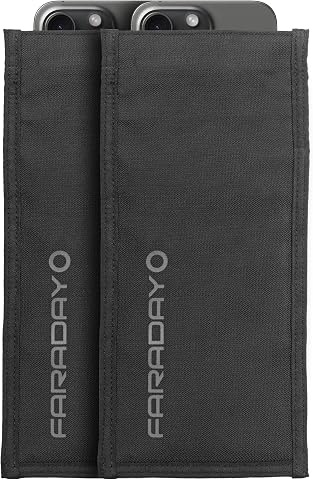
The Faraday Bag Jacket Pro offers military-grade signal shielding to block cellular, Wi-Fi, Bluetooth, RFID, and GPS signals, ensuring data security and privacy. Constructed with durable, water-resistant CORDURA nylon and a magnetic closure, it is designed for law enforcement, military, and professional use to preserve evidence and prevent hacking or tracking.
Pros:
- Provides military-grade signal shielding for security and privacy
- Durable, water-resistant CORDURA nylon construction
- Magnetic closure for quick and secure access
- Effective at blocking multiple signals including cellular, Wi-Fi, Bluetooth, and RFID
Cons:
- Bulkier than standard phone pouches
- Designed primarily for professional or law enforcement use, may be overkill for casual users
Best for: People seeking a bag for device isolation in specific situations
Not ideal for: Users who need their device connected while it is stored
Bottom line: Confirm device fit and intended shielding use before choosing this Faraday bag.
Privacy Screen Monitor
A privacy screen can help limit casual viewing of a monitor from off-center positions. The named pick is the StarTech.com 27-inch 16:9 Gold Monitor Privacy Screen, described as reversible. Confirm your monitor’s actual display size and aspect ratio before ordering; a 27-inch diagonal alone does not guarantee that a screen will fit every monitor with that measurement.
One common mistake is matching only the diagonal size while overlooking the display’s width, height, bezel, or mounting method. Compare the screen’s stated dimensions and attachment approach with your specific monitor, including whether the display is flat or curved if that distinction applies to your setup. Check which side of the reversible screen you prefer and how the finish affects your viewing comfort. A privacy screen addresses viewing angles, not the security of files or accounts, so pair it with sensible device and workspace habits. If you move between monitors, verify fit for each one rather than assuming the same screen will transfer.
What to look for:
- Match the screen’s dimensions to the monitor’s actual display area.
- Confirm the monitor’s 16:9 aspect ratio and 27-inch size.
- Check the attachment method against the monitor’s bezel and setup.
- Review the reversible orientation and choose the side that suits your use.
- Treat screen privacy as separate from account and data protection.
StarTech.com 27-inch 16:9 Gold Monitor Privacy Screen, Reversible Filter with En

This privacy screen for 27-inch widescreen monitors features Microlouver technology to obscure viewing angles and protect sensitive data. It reduces blue light exposure, minimizes eye strain, and offers a reversible gold and black finish for maximum privacy and color vibrancy.
Pros:
- Reversible gold and black finishes for maximum privacy and vibrant colors
- Reduces blue light to help minimize eye strain
- Easy to install with included adhesive strips and mounting options
Cons:
- Extra adhesive strips and mounting tabs sold separately
- Limited to 27-inch monitors with 16:9 aspect ratio
- May not fit bezel-less or very slim bezel monitors without additional accessories
Best for: Users with a compatible 27-inch 16:9 monitor
Not ideal for: People whose display dimensions or setup do not match
Bottom line: Measure the display area and confirm attachment compatibility before buying.
Secure USB Data Blocker
A USB data blocker is a tool to consider when connecting a device to a USB power source you do not control. The pick here is the OFFGRID USB-C Data Blocker, 2-Pack. Check that USB-C is the connector you need and that the blocker suits the device and power source in your intended setup. The product name identifies a two-pack, but verify the included items and use instructions before relying on it.
A common buying mistake is assuming a blocker will suit every cable, port, or charging situation. Check the connector orientation and any stated limitations, and confirm that your device can charge as intended through the blocker. It is also useful to decide where you will keep the units so one is available when needed. A data blocker does not replace careful handling of unfamiliar devices or a trusted charging setup. Review the manufacturer’s instructions for supported connections, and test the accessory with a noncritical device first if you are unsure about compatibility.
What to look for:
- Confirm USB-C is compatible with the device and power source.
- Review stated charging and connection limitations.
- Check the package contents and manufacturer instructions.
- Keep the blocker accessible for the situations where you plan to use it.
- Do not treat it as a substitute for trusted-device practices.
OFFGRID USB-C Data Blocker, 2-Pack

This compact USB-C adapter allows charging while blocking data transfer, helping protect connected devices at public charging stations. It has a metal enclosure and is designed for USB-C phones, tablets, and laptops.
Pros:
- Blocks data transfer while charging
- Compact and lightweight for travel
- Metal exterior
- Compatible with USB-C phones, tablets, and laptops
Cons:
- No USB power plug included
- Listed output voltage is 5 V
Best for: Users who want a USB-C blocker for compatible connections
Not ideal for: People whose devices require a different connector
Bottom line: Verify connector and charging compatibility before using the OFFGRID blocker.
Encrypted External SSD
An external SSD can provide portable storage for files you choose to keep off your primary device. This checklist names the Apricorn 4TB Aegis Padlock USB 3.0 SSD with 256-Bit Encryption. Before choosing it, confirm the USB connection works with your computer, check that the stated capacity suits your needs, and review the manufacturer’s instructions for setting up and unlocking the device.
One mistake is treating an encrypted drive as a complete backup strategy. Decide which files belong on it, how you will keep another copy if needed, and how authorized users can access the data if you are unavailable. Check the drive’s physical dimensions and connection requirements against your workspace and devices. Read the instructions for password setup and recovery before storing important material; a forgotten credential may affect access. Encryption can protect stored data in ways that depend on correct setup and use, so follow the product documentation rather than assuming it is ready to secure files straight out of the box.
What to look for:
- Confirm USB 3.0 compatibility with your device or adapter.
- Check that 4TB meets your storage needs.
- Review setup, unlocking, and credential-recovery instructions.
- Plan separate backup copies for important files where appropriate.
- Understand how authorized users can access the data if needed.
Apricorn 4TB Aegis Padlock USB 3.0 SSD with 256-Bit Encryption

The Apricorn Aegis Padlock SSD offers high-capacity portable storage with hardware encryption, ensuring data security with a keypad for PIN entry and multiple security modes. It features fast USB 3.0 read/write speeds and cross-platform compatibility, making it suitable for both personal and business use.
Pros:
- High-capacity 4TB portable SSD
- 256-bit AES hardware encryption for security
- Easy keypad PIN setup without software
- Cross-platform compatibility
Cons:
- USB 1.1 interface may limit transfer speeds
- Some users may find the security features complex
- No mention of included software or additional accessories
Best for: Users seeking a portable encrypted storage option
Not ideal for: Anyone who needs a drive without credential-management steps
Bottom line: Confirm device compatibility and understand access recovery before storing important files.
Build the checklist around what matters most in your routine: first review account support and recovery planning, then address seed phrase handling, and next check the devices and connections you use. Add screen privacy, signal blocking, or portable encrypted storage where each fits a clear need. Compatibility and recovery planning should guide the order more than collecting accessories.
You do not need to adopt every item at once. Compare the listed product details with your own devices, follow the relevant setup instructions, and make sure you can recover access to anything you protect. A careful, practical plan is a strong place to start—choose deliberately and revisit it when your accounts or hardware change.
Halloween Picks
halloween
As an affiliate, we earn on qualifying purchases.